Note
Go to the end to download the full example code.
Network assortativity and distance-preserving surrogates
This example demonstrates how to calculate network assortativity and generate distance-preserving surrogate connectomes for null hypothesis testing. We’ll use structural connectivity data and myelin maps from Bazinet et al. (2023) to explore how brain network topology relates to spatial patterns of cortical features:
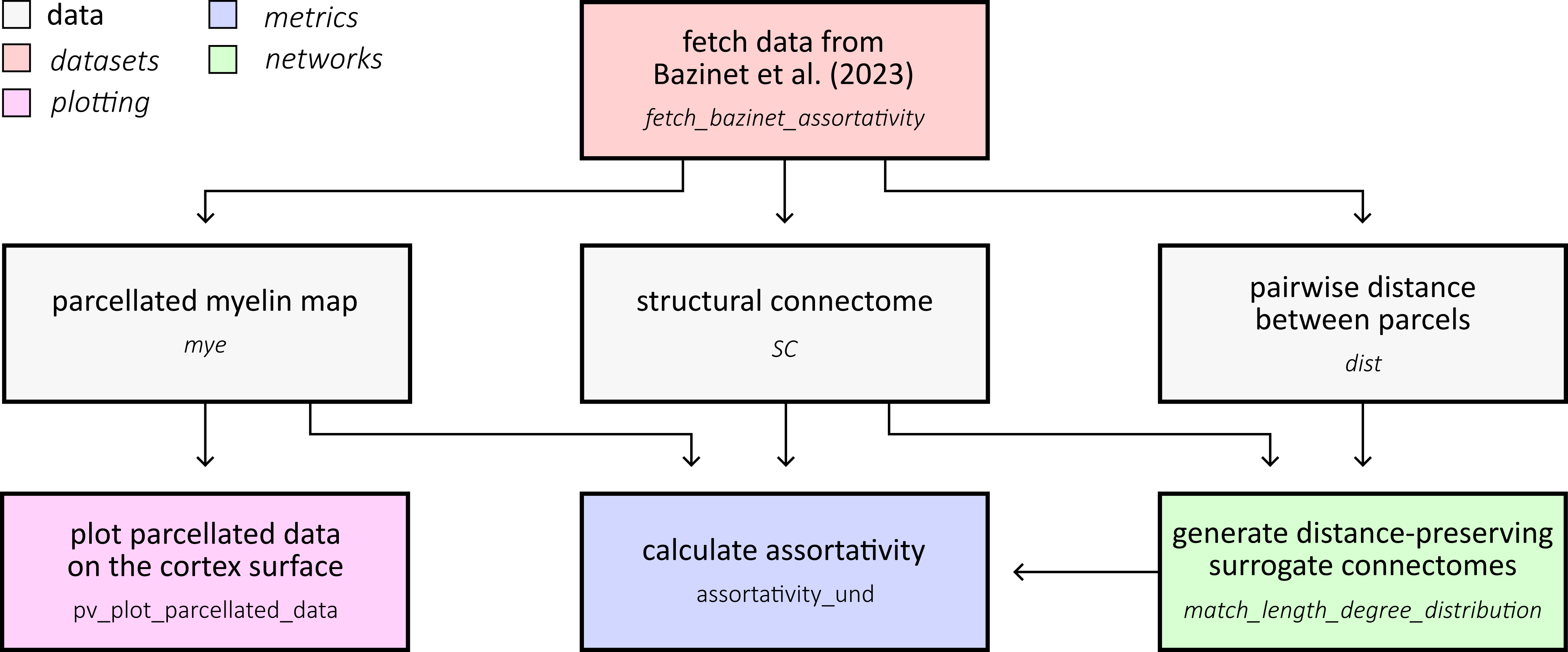
First, let’s fetch the structural connectivity and myelin data from Bazinet et al. (2023). This dataset contains a 400-parcel structural connectome with a corresponding distance matrix specifying the distance between parcel centroids. It also contains a T1w/T2w myelin map:
import numpy as np
import pickle
from netneurotools.datasets import fetch_bazinet_assortativity

bazinet_path = fetch_bazinet_assortativity()

with open(f'{bazinet_path}/data/human_SC_s400.pickle', 'rb') as file:
    human_data = pickle.load(file)

SC = human_data['adj']
dist = human_data['dist']
myelin = human_data['t1t2']

print(f'Structural connectivity shape: {SC.shape}')
print(f'Distance matrix shape: {dist.shape}')
print(f'Myelin data shape: {myelin.shape}')
Please cite the following papers if you are using this function:
  [primary]:
    Vincent Bazinet, Justine Y Hansen, Reinder Vos de Wael, Boris C Bernhardt, Martijn P van den Heuvel, and Bratislav Misic. Assortative mixing in micro-architecturally annotated brain connectomes. Nature Communications, 14(1):2850, 2023.
[fetch_single_file] Downloading data from
https://github.com/netneurolab/bazinet_assortativity/archive/baab96d173b8c5a2656
67a4259cf228713dabcc7.tar.gz ...
[fetch_single_file] Downloaded 14163968 of ? bytes.
[fetch_single_file] Downloaded 27533312 of ? bytes.
[fetch_single_file] Downloaded 41680896 of ? bytes.
[fetch_single_file] Downloaded 55320576 of ? bytes.
[fetch_single_file] Downloaded 59252736 of ? bytes.
[fetch_single_file] Downloaded 63176704 of ? bytes.
[fetch_single_file] Downloaded 67117056 of ? bytes.
[fetch_single_file] Downloaded 75235328 of ? bytes.
[fetch_single_file] Downloaded 94633984 of ? bytes.
[fetch_single_file] Downloaded 105906176 of ? bytes.
[fetch_single_file] Downloaded 109051904 of ? bytes.
[fetch_single_file] Downloaded 112197632 of ? bytes.
[fetch_single_file] Downloaded 115343360 of ? bytes.
[fetch_single_file] Downloaded 122683392 of ? bytes.
[fetch_single_file] Downloaded 134217728 of ? bytes.
[fetch_single_file] Downloaded 137109504 of ? bytes.
[fetch_single_file] Downloaded 139993088 of ? bytes.
[fetch_single_file] Downloaded 143925248 of ? bytes.
[fetch_single_file] Downloaded 148897792 of ? bytes.
[fetch_single_file] Downloaded 152043520 of ? bytes.
[fetch_single_file] Downloaded 157032448 of ? bytes.
[fetch_single_file] Downloaded 160432128 of ? bytes.
[fetch_single_file] Downloaded 167256064 of ? bytes.
[fetch_single_file] Downloaded 170131456 of ? bytes.
[fetch_single_file] Downloaded 173285376 of ? bytes.
[fetch_single_file] Downloaded 176431104 of ? bytes.
[fetch_single_file] Downloaded 181141504 of ? bytes.
[fetch_single_file] Downloaded 202907648 of ? bytes.
[fetch_single_file] Downloaded 205791232 of ? bytes.
[fetch_single_file] Downloaded 208674816 of ? bytes.
[fetch_single_file] Downloaded 212074496 of ? bytes.
[fetch_single_file] Downloaded 216268800 of ? bytes.
[fetch_single_file] Downloaded 219283456 of ? bytes.
[fetch_single_file] Downloaded 222035968 of ? bytes.
[fetch_single_file] Downloaded 229122048 of ? bytes.
[fetch_single_file] Downloaded 232005632 of ? bytes.
[fetch_single_file] Downloaded 235151360 of ? bytes.
[fetch_single_file] Downloaded 238288896 of ? bytes.
[fetch_single_file] Downloaded 242745344 of ? bytes.
[fetch_single_file] Downloaded 246161408 of ? bytes.
[fetch_single_file] Downloaded 267010048 of ? bytes.
[fetch_single_file] Downloaded 293183488 of ? bytes.
[fetch_single_file] Downloaded 316465152 of ? bytes.
[fetch_single_file] Downloaded 338739200 of ? bytes.
[fetch_single_file] Downloaded 359931904 of ? bytes.
[fetch_single_file] Downloaded 381952000 of ? bytes.
[fetch_single_file] Downloaded 403963904 of ? bytes.
[fetch_single_file] Downloaded 425197568 of ? bytes.
[fetch_single_file] Downloaded 446431232 of ? bytes.
[fetch_single_file] Downloaded 467935232 of ? bytes.
[fetch_single_file] Downloaded 488120320 of ? bytes.
[fetch_single_file] Downloaded 510918656 of ? bytes.
[fetch_single_file] Downloaded 531374080 of ? bytes.
[fetch_single_file] Downloaded 553394176 of ? bytes.
[fetch_single_file] Downloaded 575406080 of ? bytes.
[fetch_single_file]  ...done. (59 seconds, 0 min)

Downloaded ds-bazinet_assortativity to /home/runner/nnt-data
/home/runner/work/netneurotools/netneurotools/examples/plot_assortativity.py:34: DeprecationWarning: numpy.core.numeric is deprecated and has been renamed to numpy._core.numeric. The numpy._core namespace contains private NumPy internals and its use is discouraged, as NumPy internals can change without warning in any release. In practice, most real-world usage of numpy.core is to access functionality in the public NumPy API. If that is the case, use the public NumPy API. If not, you are using NumPy internals. If you would still like to access an internal attribute, use numpy._core.numeric._frombuffer.
  human_data = pickle.load(file)
Structural connectivity shape: (400, 400)
Distance matrix shape: (400, 400)
Myelin data shape: (400,)
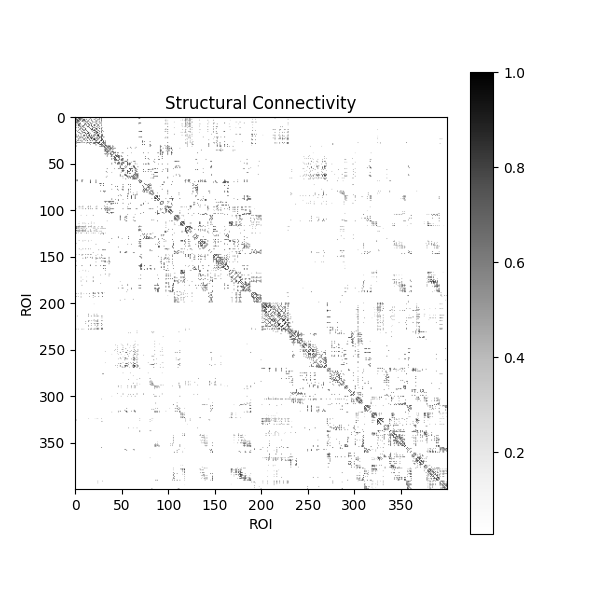
Let’s visualize the structural connectivity matrix. This shows the weighted connections between all pairs of brain regions:
<matplotlib.colorbar.Colorbar object at 0x7fdc58e82630>
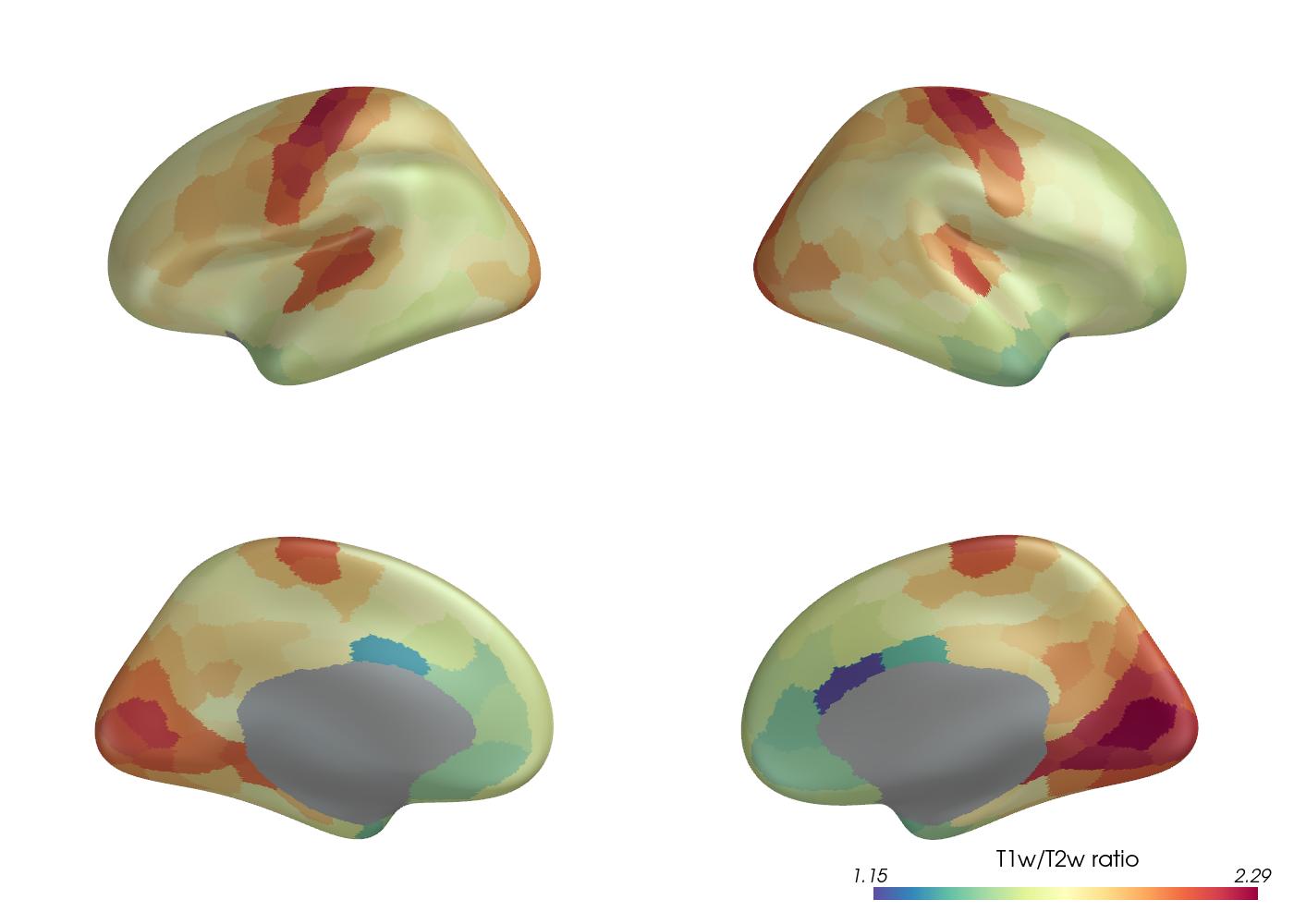
Let’s visualize the parcellated myelin data on the cortical surface. The structural connectivity and myelin data have been parcellated with the Schaefer (400 nodes) parcellation.
from netneurotools.plotting import pv_plot_parcellated_data

# This is necessary for headless rendering when building the sphinx gallery.
# If you are running this code locally, you might not need this line.
import os
os.environ["VTK_DEFAULT_OPENGL_WINDOW"] = "vtkOSOpenGLRenderWindow"

pv_plot_parcellated_data(myelin,
                         'schaefer400x7',
                         cmap='Spectral_r',
                         clim=[np.min(myelin), np.max(myelin)],
                         cbar_title='T1w/T2w ratio',
                         lighting_style='plastic',
                         jupyter_backend="static")
Please cite the following papers if you are using this function:
  [primary]:
    Alexander Schaefer, Ru Kong, Evan M Gordon, Timothy O Laumann, Xi-Nian Zuo, Avram J Holmes, Simon B Eickhoff, and BT Thomas Yeo. Local-global parcellation of the human cerebral cortex from intrinsic functional connectivity mri. Cerebral cortex, 28(9):3095–3114, 2018.
[fetch_single_file] Downloading data from
https://files.osf.io/v1/resources/udpv8/providers/osfstorage/673273c54b79ea9a506
2f4b3 ...
[fetch_single_file]  ...done. (2 seconds, 0 min)

Downloaded atl-schaefer2018 to /home/runner/nnt-data
<PIL.Image.Image image mode=RGB size=1400x1000 at 0x7FDC380563F0>

<pyvista.plotting.plotter.Plotter object at 0x7fdc29305f70>
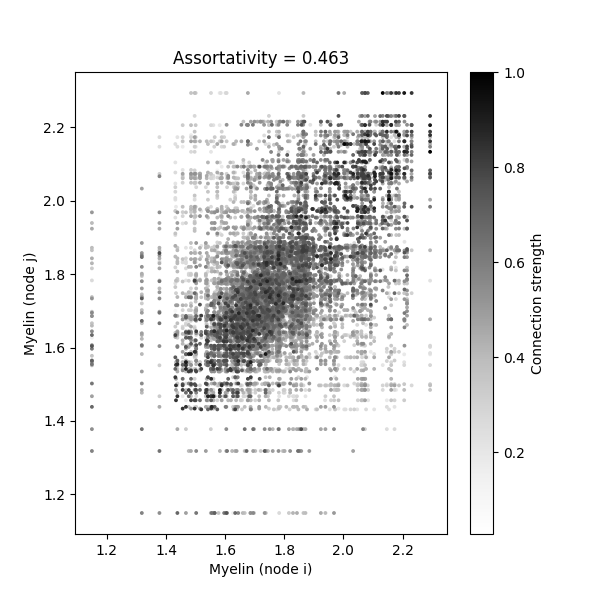
Network assortativity measures the tendency for nodes with similar features to be connected. Let’s calculate the assortativity of the myelin distribution with respect to the structural connectivity network:
from netneurotools.metrics import assortativity_und

assort = assortativity_und(myelin, SC, use_numba=False)
print(f'Network assortativity: {assort:.3f}')
Network assortativity: 0.463
We can visualize this by creating a scatterplot showing the myelin values of connected node pairs, with point colors indicating connection strength:
SC_E = SC > 0
Xi = np.repeat(myelin[np.newaxis, :], 400, axis=0)
Xj = np.repeat(myelin[:, np.newaxis], 400, axis=1)
sort_ids = np.argsort(SC[SC_E])

fig, ax = plt.subplots(figsize=(6, 6))
scatter = ax.scatter(
    Xi[SC_E][sort_ids],
    Xj[SC_E][sort_ids],
    c=SC[SC_E][sort_ids],
    cmap='Greys',
    s=3,
    rasterized=True
)
ax.set(xlabel='Myelin (node i)', ylabel='Myelin (node j)')
ax.set_title(f'Assortativity = {assort:.3f}')
fig.colorbar(scatter, ax=ax, label='Connection strength')
<matplotlib.colorbar.Colorbar object at 0x7fdc0c3df3b0>
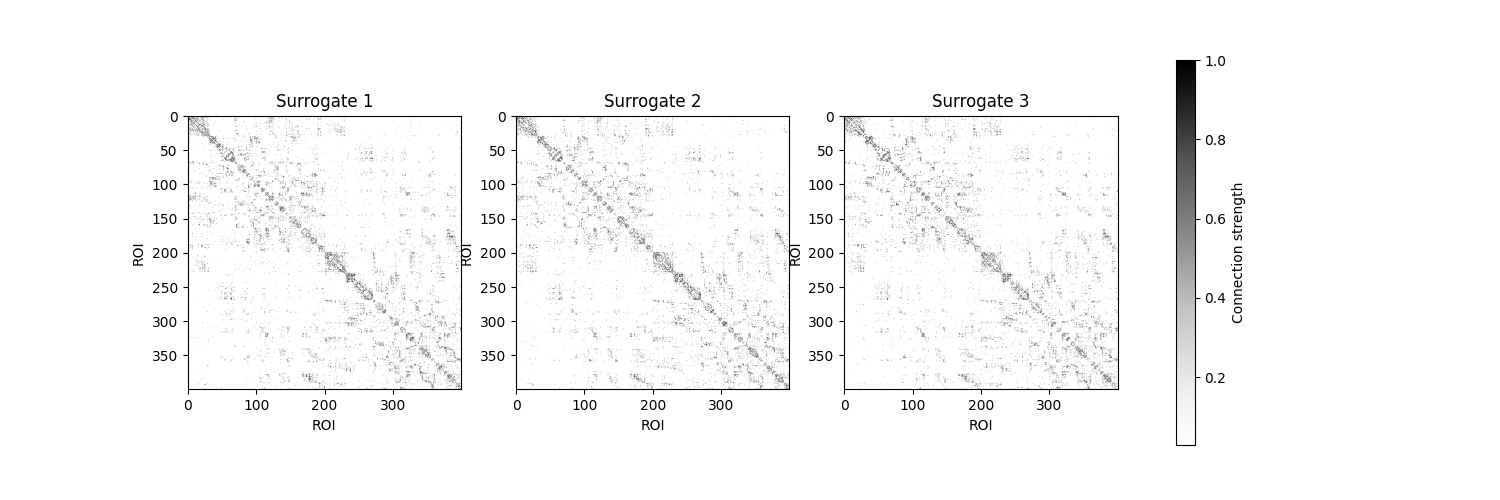
To test whether this assortativity is significant, we need null models that preserve key topological properties. We’ll generate distance-preserving surrogate networks that maintain the degree distribution and spatial embedding of connections. For this, we need the empirical structural connectome and a matrix specifying the distance between each parcel.
Note: Generating many surrogates can be time-consuming. For this example, we’ll create just a few surrogates:
from netneurotools.networks import match_length_degree_distribution

n_surrogates = 10
surr_all = np.zeros((n_surrogates, 400, 400))

for i in range(n_surrogates):
    surr_all[i] = match_length_degree_distribution(SC, dist)[1]

print(f'Generated {n_surrogates} surrogate networks')
Generated 10 surrogate networks
Let’s visualize a few of these surrogate connectomes to see how they compare to the empirical network:
fig, axes = plt.subplots(1, 3, figsize=(15, 5))
for i, ax in enumerate(axes):
    im = ax.imshow(
        surr_all[i],
        cmap='Greys',
        vmin=surr_all[i][surr_all[i] > 0].min(),
        vmax=surr_all[i].max()
    )
    ax.set_title(f'Surrogate {i + 1}')
    ax.set(xlabel='ROI', ylabel='ROI')
fig.colorbar(im, ax=axes.ravel().tolist(), label='Connection strength')
<matplotlib.colorbar.Colorbar object at 0x7fdc0c2b8260>
Now we’ll calculate the assortativity for each surrogate network to create a null distribution:
assort_surr = np.zeros(n_surrogates)
for i in range(n_surrogates):
    assort_surr[i] = assortativity_und(myelin, surr_all[i])

print(f'Mean surrogate assortativity: {np.mean(assort_surr):.3f}')
print(f'Std surrogate assortativity: {np.std(assort_surr):.3f}')
Mean surrogate assortativity: 0.400
Std surrogate assortativity: 0.006
Finally, we can compare the empirical assortativity to the null distribution using a boxplot. This visualization shows whether the observed assortativity is significantly different from what we’d expect by chance:
fig, ax = plt.subplots(figsize=(4, 6))

flierprops = dict(
    marker='+',
    markerfacecolor='lightgray',
    markeredgecolor='lightgray'
)

bplot = ax.boxplot(
    assort_surr,
    widths=0.3,
    patch_artist=True,
    showfliers=True,
    showcaps=False,
    flierprops=flierprops
)

for box in bplot['boxes']:
    box.set(facecolor='lightgray', edgecolor='black')
for median in bplot['medians']:
    median.set(color='black', linewidth=2)

ax.scatter(1, assort, color='red', s=100, zorder=3, label='Empirical')
ax.set_xticks([1])
ax.set_xticklabels(['Surrogates'])
ax.set_ylabel('Assortativity')
ax.set_title('Empirical vs. Null Distribution')
ax.legend()
ax.set_xlim(0.7, 1.3)

plt.tight_layout()
The red dot shows the empirical assortativity, while the boxplot shows the distribution of assortativity values from the distance-preserving surrogate networks. If the empirical value falls outside the null distribution, this suggests that the observed pattern of myelin assortativity is not explained by the spatial constraints and topology of the connectome alone.
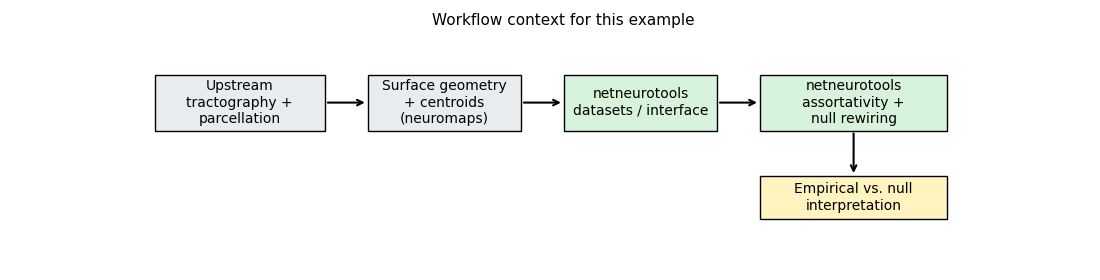
The limitation is equally important: geometry-aware nulls still depend on the quality of the upstream surface / centroid information, and generating large surrogate ensembles can be computationally expensive.
Total running time of the script: (1 minutes 20.082 seconds)